How I Decide What Pages a Website Needs
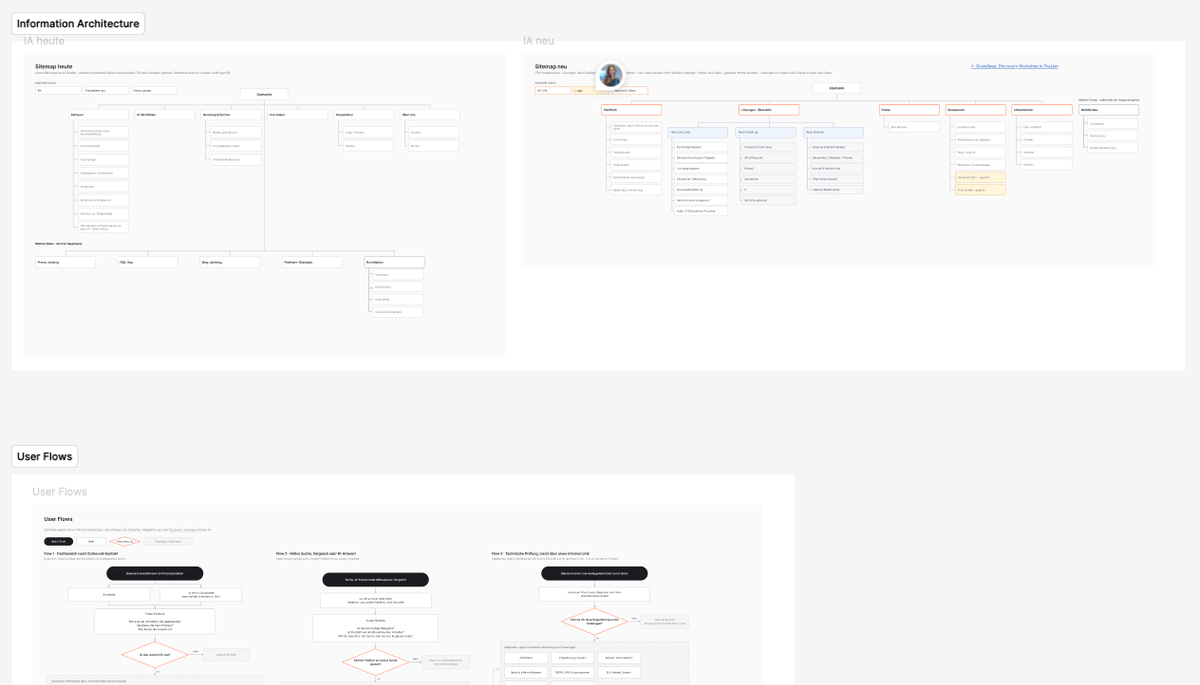
Before you can design a website, you need to know which pages you are actually designing. The homepage, sure. But what else?
That question comes before what the homepage looks like or whether the navigation needs a mega menu. It is a more basic structural question: what should exist in the first place?
On a redesign, there is an existing website. It already has a structure, and you can crawl it and put all the URLs into a spreadsheet. But that does not mean the structure is right. It is just what exists today. I treat it as something to evaluate, not as the starting point.
For a new website, you do not even have that.
In both cases, though, I want to get to roughly the same place before I start designing: a sitemap where I can explain why the pages exist, what information belongs where, and how different people are likely to move through it. Getting there means pulling together quite a few different inputs and making some judgement calls about what deserves a page and what belongs together. Here is how I approach it.
Gather the inputs before drawing the sitemap
I usually draw on a few different sources of information when I start thinking about the structure of a website. The first is what customers or users need from it. Most of this comes out of the discovery workshop as customer journeys. What brings them to the website? What are they trying to understand? What questions come up while they are evaluating the company or product? What might stop them from taking the next step?
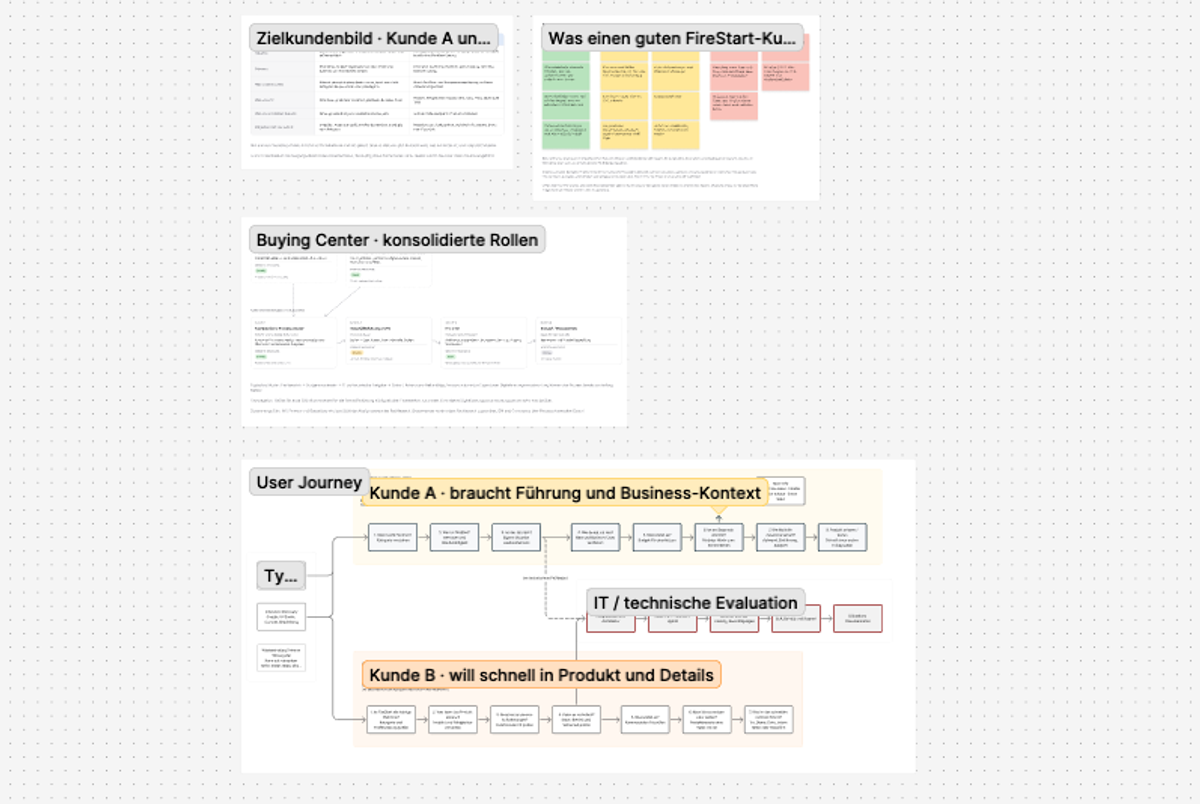
The second is what the business needs the website to communicate or enable. There might be a new product that needs explaining, industries the company wants to target, a self-service flow that does not exist yet, documentation that needs to be accessible, or requirements from sales, support and marketing.
The third is what competitors and the wider industry are doing. Not to copy them. But people are used to certain patterns, especially when it comes to navigation and how websites in a space are typically structured. If most companies in the industry have a pricing page, an integrations section or similar top-level groups, visitors will look for those things on your website too. You do not have to follow every convention, but you should not go against all of them without a reason. I just want a feeling for what is common before I decide where to follow it and where to do something different.
The fourth is what people are already looking for. On an existing website, Google Search Console can show me the queries that bring people to the site and which pages they land on. Analytics can show which pages people actually visit, where they enter, and what they do next. Keyword research helps me look beyond the current website and understand how people search for the problems, products and alternatives in this space. This can reveal needs that never came up in a workshop or stakeholder interview.
And on a redesign, there is one more: the website that already exists.
I don't think any one of these should become the sitemap on its own. Starting only from customer journeys can make you miss things like support, documentation, careers, legal requirements or content that serves a different audience. Starting from stakeholder requests can very quickly turn the website into a reflection of the company's internal structure.
Starting from competitors gives you their structure, which was built around their product and their customers, not yours. Starting from keyword volumes tells you what people search for, not everything they need to make a decision. And starting from the current website makes it very easy to spend the project reorganising decisions that were made years ago. I want all of them as inputs, but I don't want any of them to dictate the answer.
If there is an existing website, I inventory it early
On a recent B2B redesign, the existing website had more than 200 URLs. Before deciding what the new structure should look like, I wanted to know what was actually there. So I crawled the site and created a content inventory.
At this point, I am not trying to decide where every URL will live on the new website. I mainly want to understand the material I am working with. How much content is there? What types of pages exist? Are there obvious duplicates? Are there sections that have grown much larger than expected? Are there old campaign pages, outdated product pages or content that is difficult to reach through the current navigation? A crawl can uncover quite a different website from the one you see by clicking around the header.
What I would not do at this stage is take those 200 pages and immediately start arranging them into a nicer hierarchy. That still makes the old website the starting point for the new one. I come back to the inventory later, once I have a proposed structure. Then every existing URL can be mapped against it and given a decision: keep it, rewrite it, merge it with something else, redirect it or remove it.
If I am working on a completely new website, this part simply disappears. There is nothing to audit, and that is fine. A content audit is useful because a redesign has existing content to deal with, not because every IA process requires one.
Build a list of what the website needs to cover
Now I bring those inputs together and turn them into requirements. A buyer might need to understand what the product does, whether it fits their situation, how it works, whether it integrates with their systems, how it is deployed, whether it meets their security requirements, what it costs and what happens next.
Research might add needs that were not obvious from the customer journey. Search data might surface a comparison people are actively looking for. Sales might keep hearing the same deployment question. Product might know about an integration that needs much more visibility.
At this point, I am collecting requirements rather than naming pages. That distinction matters because one requirement does not automatically equal one page.
"People need to understand how the product integrates with their existing systems" tells me something the website needs to answer. It does not yet tell me whether I need an Integrations section, a dedicated page, an integration directory, or some combination of those. That is the next decision.
What actually deserves its own page?
This is usually where the sitemap starts taking shape. Some decisions are obvious. Others are surprisingly difficult. If security matters to the buying process, should it have its own page? Should deployment be part of Product or a separate page? Does every industry need its own solution page? Should pricing have a page if there is no fixed price to publish?
I don't think there is a universal rule based on how much copy you have. Instead, I look at a few things:
- Is there a distinct intent? Would someone specifically come to the website looking for this information?
- Could someone land here directly? Search, AI results, ads, sales emails and links shared between colleagues mean that many pages have to work as entry points, not just as stops after the homepage.
- Is there enough depth? Can the topic answer a meaningful set of questions, or would I be creating a page around two paragraphs that belong somewhere else?
- Does it need to be shared? If sales regularly needs to send prospects information about security, giving that information a stable destination can be useful even if it could technically fit on another page.
- How important is it to the decision? Some subjects deserve visibility because they repeatedly determine whether someone continues evaluating the product.
- How much would it overlap with another page? If two proposed pages would mostly say the same thing, the distinction probably makes more sense in my sitemap than it will to the person using the website.
I don't treat these as a scorecard where a topic needs four out of six points to become a page. They are prompts for making the decision.
Pricing is a good example. A B2B company might not have three neat pricing tiers it can publish. But if cost is one of the major questions during evaluation, hiding pricing because "we don't have prices" does not solve the user's problem. A pricing page might instead explain how pricing works, what affects it, what is included and what someone should expect before asking for a quote.
The question is not only whether I have enough content for a page. It is whether giving that information its own place makes the website easier to understand and use.
Then I can build the information architecture
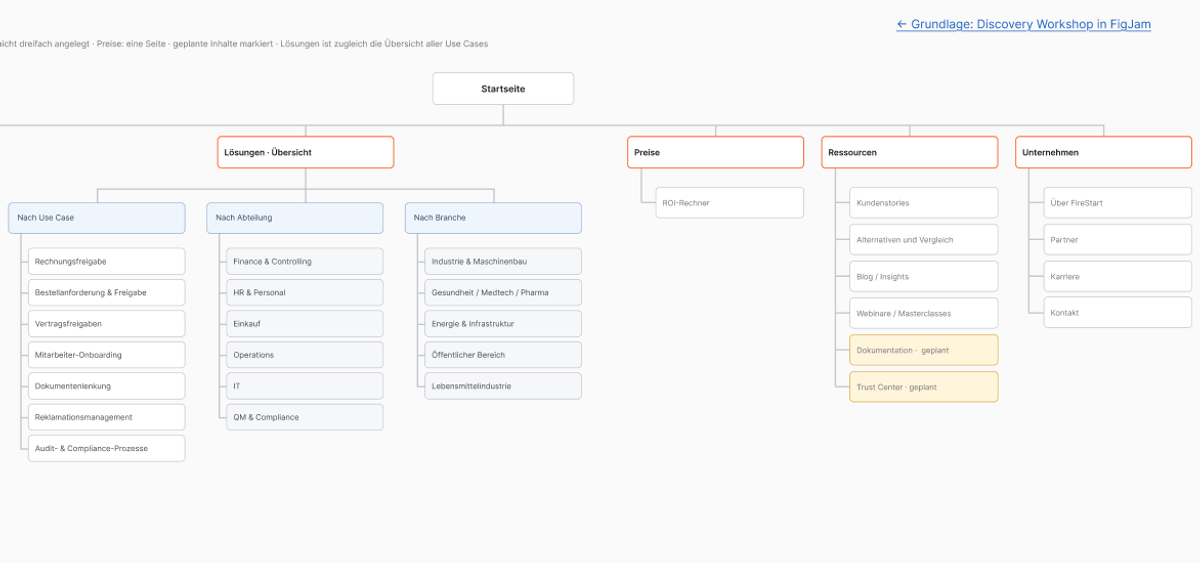
Once I have a set of page candidates, I can start grouping them and deciding how they relate to each other. This is the part that usually ends up as boxes and lines in FigJam or Figma, but drawing the diagram is the easy bit. The harder decisions are about hierarchy.
Where does Security belong? It could sit under Product because security is a characteristic of the product. It could sit inside a Trust Center because the visitor is looking for evidence and assurance. It might also need to be linked from enterprise solutions, documentation and the footer. A page can be relevant in several contexts without needing several copies. I generally want it to have one sensible home in the information architecture and then make it accessible from the other places where someone is likely to need it.
The same applies to the larger groups. Product, Solutions, Resources and Company are not useful categories simply because a lot of B2B websites use those words. They are useful only if the pages underneath them form groups that make sense to the people using the website. For larger or less obvious structures, this is also where methods like card sorting and tree testing can be useful. I do not have to assume that the hierarchy that makes sense to me will make sense to everyone else.
By this point I have a first sitemap. But it is still a hypothesis.
Reconcile the old website with the new one
If this is a redesign, this is where I return to the content inventory and give every existing URL its decision. This is also a useful check on the new IA. If I keep finding valuable existing content with nowhere sensible to put it, I might have missed something in the new structure. If an entire section of the old site disappears and I cannot explain why, I want to look at it again before removing it.
A page might look outdated or unimportant when I read it, but Search Console shows that it brings in meaningful search traffic. Another page might receive very little traffic but be important late in the sales process and regularly shared by the sales team. Traffic alone does not decide whether a page survives.
For a new website, there is obviously nothing to reconcile. I can move directly from the proposed IA to testing it.
A sitemap is not your navigation
This sounds obvious, but it is surprisingly easy to blur the two when drawing an IA. I ran into exactly this on a recent project. We had spent so much time thinking about the primary navigation that our diagram was starting to describe the navigation rather than the complete website.
But not every page needs to be in the header. There might be careers pages, support, login, FAQs, legal pages, campaign landing pages and other utility content. Those pages still exist in the information architecture even if someone reaches them through the footer, a contextual link, search or somewhere else entirely. I find it useful to keep those pages visible in the sitemap rather than pretending they do not exist because they are outside the primary navigation.
The distinction I use is fairly simple: the sitemap describes what exists and how it relates. Navigation describes some of the ways people can access it.
That also means a page can appear in several navigation contexts without needing several homes in the sitemap. An integrations page might live under Product but also be linked prominently from a particular Solution page. A security page might have one canonical place in the IA while being accessible from Product, Enterprise and the footer. The tree does not have to represent every possible route someone can take through the website. That is what the next step is for.
I use user flows to try to break the sitemap
A sitemap is very good at making a website look tidy. Everything has a parent. Every page has a place. The hierarchy makes sense when you look at the whole thing from above.
Visitors never see the website like that.
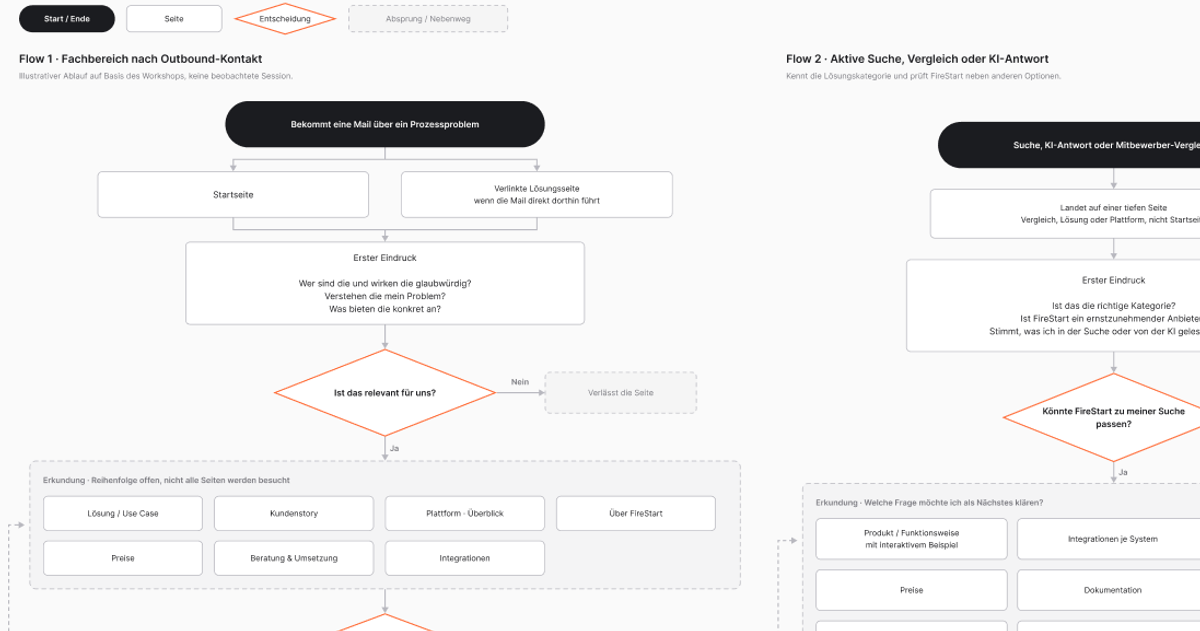
They arrive on one page with some amount of context, looking for something, and then decide what to do next. This is also where user flows are different from the customer journeys that came out of the workshop. A journey describes what someone is trying to do across the whole buying process. A user flow follows them through this specific website, page by page. That is why I do flows after the first IA, not before. I need a proposed structure before I can test how someone would move through it.
So once I have a first version of the IA, I take a few realistic situations and map them through it. And I deliberately do not make all of them start on the homepage:
- Someone might search for a problem and land directly on a solution page.
- Someone might receive a link from sales and come to the website mainly to check whether the company is credible.
- A technical stakeholder might receive an architecture or security page from a colleague without ever having seen the homepage.
- Someone else might already know the product, return to the website and go straight to pricing.
For each one, I map what they are trying to understand, where they enter, what they are likely to need next and which pages in the proposed IA are supposed to answer those questions.
This tends to expose problems that are difficult to see in a sitemap. Maybe a page works perfectly if you arrive through Product but makes very little sense as a landing page from Google. Maybe two pieces of information that sit in completely different branches of the IA are almost always needed together. Maybe someone has to go back through the navigation every time they want to continue evaluating the product. Or maybe the flow exposes an information need that does not have a page at all.
That does not necessarily mean the sitemap was wrong. It means I now know where the website needs contextual links, related content, clearer orientation or sometimes a structural change. I am not using flows to draw every possible click someone could make. I am using a few representative flows to test whether the structure survives contact with realistic behaviour.
Then I can start wireframing
By this point, I know much more than the names of the pages. I know why a page exists, which questions it needs to answer, where someone might arrive from, what they may need next and how the page relates to the rest of the website. That gives me a much better starting point for wireframes.
Instead of opening a blank frame called "Product" and asking what usually goes on a product page, I already have a job for that page to do.