Paper Design vs Figma: Two Different Bets on the Future of Design
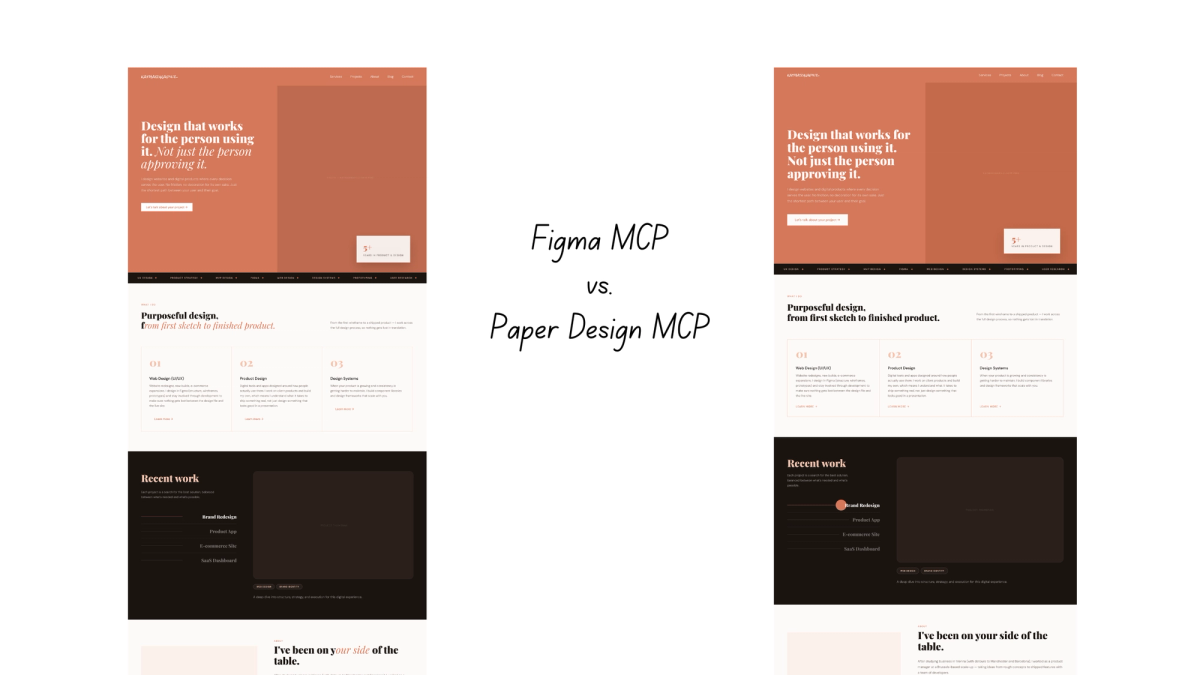
If you have been using Figma for a while, Paper Design probably showed up in your feed at some point and you wondered if it was worth paying attention to. Another design tool. Another "future of design" pitch. Easy to scroll past.
But Paper Design is doing something genuinely different, and understanding what that is changes how you think about both tools. This is not a comparison of features. It is a comparison of two completely different ideas about what a design tool should be in the age of AI.
The problem both are trying to solve is the same one designers and developers have complained about forever. You design something in Figma, a developer recreates it in code, something gets lost, things drift, the Figma file stops reflecting what is actually in production. Everyone knows this gap. Most teams have just learned to live with it.
What is interesting right now is that both Figma and Paper Design are directly trying to close that gap, but from completely opposite starting points. And which approach actually works better in practice is worth finding out.
Figma: The platform bet
Figma has been the default design tool for most product teams for years and it earned that position. The canvas is powerful and flexible. You can design everything from wireframes to high-fidelity interfaces, build and maintain complex design systems, prototype interactions, and collaborate in real time with your whole team. Dev Mode gives developers direct access to specs, assets, and code snippets without needing to ask a designer. Figma Make lets you turn designs into interactive prototypes and even simple apps. The plugin ecosystem is enormous. The community is enormous. It is the tool everyone knows and most teams have already standardized on.
It is also not standing still. The moves Figma has been making over the past year make clear it is not trying to stay just a design tool.
At Config 2025 it launched Figma Sites, a way to design and publish full websites without leaving Figma. Then it acquired Payload, one of the most respected open-source headless CMS projects in the developer community. The message behind that acquisition was explicit: Figma wants to be where design, content, and deployment all happen in one place. Not just where you design things, but where you ship them.
Then in March 2026 it opened the canvas to AI agents. Via the new use_figma tool, Claude Code and other MCP clients can now generate and modify design assets directly on the Figma canvas using your actual components and variables. Not reading from Figma, writing to it.
Put all of this together and Figma's bet becomes clear. It is becoming an end-to-end platform. Design, AI agents, CMS, deployment. The canvas stays proprietary but everything connects to it. The gap between design and code gets closed not by changing the canvas but by building powerful bridges around it.
For teams already in Figma, that is a compelling vision. Everything in one place, the tool you already know, AI making the workflow faster without asking you to change how you work.
Paper Design: The code-native bet
Paper Design starts from a completely different premise. Rather than building bridges between design and code, it asks: what if they were never separate in the first place?
When you design in Figma, you are working in Figma's own format. It looks like a website, it feels like you are designing for the web, but underneath it is a proprietary system. A developer still has to take what you made in Figma and rebuild it in actual code.
The canvas in Paper, on the other hand, is built on web standards. Every element you place is real HTML and CSS. Not a proprietary format that gets translated later. The layout engine understands flexbox, padding, gap, and all the properties that actually matter on the web. When you design in Paper, you are already working in the language of the browser.
That sounds like a technical detail but it changes everything about how AI agents can work with your designs. When Claude reads a Paper canvas it is reading actual web code, not a design format it has to interpret. The translation layer that exists between Figma and code simply does not exist in Paper. What you design is what ships.
Paper also has a fully bidirectional MCP server, with 24 tools for both reading and writing. Agents can create artboards, update styles, set text content, get screenshots, and retrieve the JSX or Tailwind output of any node. It has been built for agent manipulation from the ground up, not added on top later.
Beyond the code-native canvas, Paper has a few things you genuinely cannot do in Figma. Its shader library is remarkable with GPU-accelerated visual effects like mesh gradients, liquid metal, fluted glass, and halftone patterns that run natively on the canvas and copy out as production-ready code. For designers who care about distinctive visual language, that is a meaningful differentiator.
Paper is still in open alpha. The free tier gives you 100 MCP calls per week, the Pro plan is $20 per month. It is moving fast but it is not yet the polished, mature tool Figma is. That trade-off is worth being honest about.
The ideal Paper user right now is probably a designer-developer hybrid or a small team building AI-first workflows. Someone comfortable enough with code to appreciate what a web-native canvas actually means. If that is you, Paper is worth paying serious attention to.
Two tools, two different users
Looking at both tools side by side, it is tempting to ask which one is better. But that is probably the wrong question. They are not really competing for the same person.
Figma is built for teams. Large teams, cross-functional teams, teams where designers, developers, product managers, and stakeholders all need to work together in one place. Its strength is in collaboration, consistency, and the sheer breadth of what it can do. If you are working in a company where design needs to be shared, reviewed, approved, and handed off at scale, Figma is the obvious choice. It is also where most designers already are, which means switching costs are high and the argument for staying is strong.
Paper is built for a different kind of person. The designer-developer hybrid. The solo founder. The small team that moves fast and wants their tools to reflect how the web actually works. If you are someone who is comfortable in code, who understands what HTML and CSS mean in practice, and who wants the design tool to stay as close to production as possible, Paper's approach is genuinely exciting.
The Payload acquisition reinforces this. Figma is not just competing with Paper — it is competing with Webflow, Framer, and eventually parts of WordPress. It is becoming a platform for entire digital product teams. Paper is not trying to do that. It is trying to be the best possible tool for the person who designs and ships.
That distinction matters when you are evaluating which one to use. If you are a designer in a larger team who already lives in Figma, Paper is not asking you to switch entirely. It is a different tool for a different moment in your workflow. If you are a designer who codes, or who works closely with a developer on a small team, Paper might actually be the more natural fit.
Putting both to the test
Now that we understand the two approaches, the natural question is how they actually compare in practice. Specifically on the thing that matters most for this kind of workflow: How well each tool can read your existing codebase and translate it into something you can work with on the canvas. That is the test worth running.
Same codebase, same brief, same AI. The only variable was the design tool.
The prompt was deliberately simple:
"Use the Figma MCP. Read the codebase and bring the full homepage into Figma (link to file)."
And for Paper:
"Use the Paper Design MCP. Read the codebase and bring the full homepage into Paper Design (link to file)."
No styling direction, no layout hints, no extra context. Just the codebase and the instruction to translate it into the canvas. The goal was to see how well each tool's implementation, not the AI, could read a real codebase and produce something usable.
The codebase is my personal site bykatharina.com, built with Next.js, Tailwind, and Sanity CMS. A proper design token system, custom fonts, component-based sections, and a few subtle details like decorative elements and mixed typography within headings. Complex enough to be a real test, not a controlled demo.
Both used Claude as the agent, connected via their respective MCP servers, run from the terminal.
The results
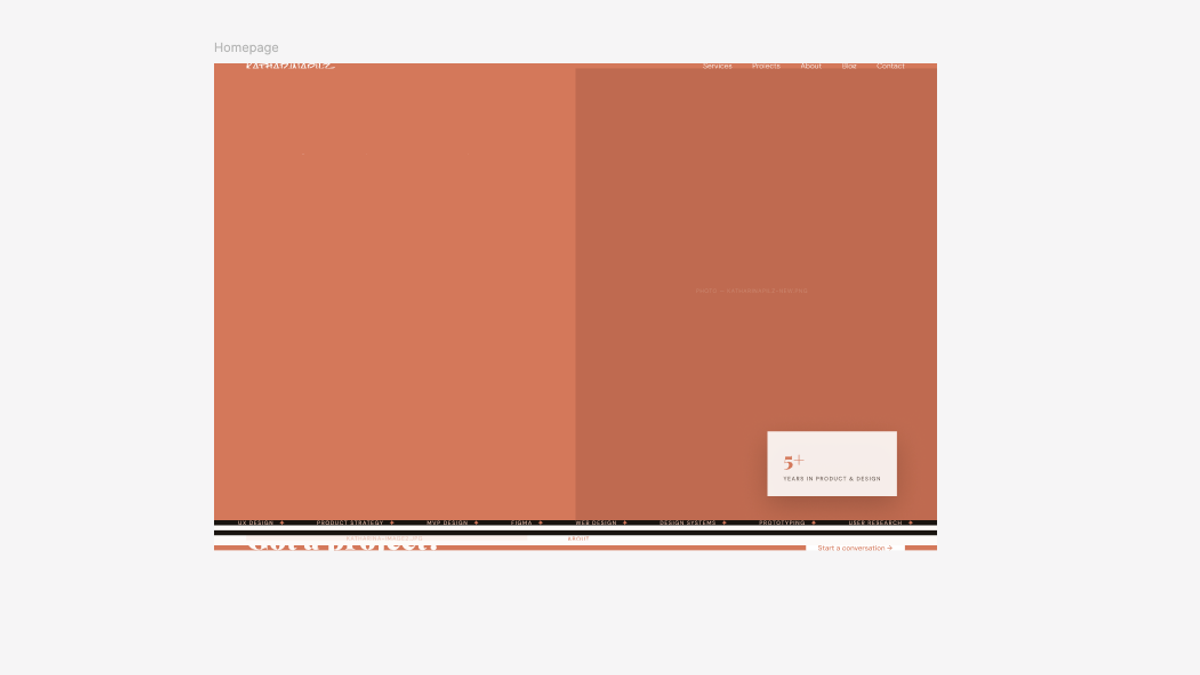
Figma went first. The initial result was not great. The hero section was almost entirely a solid salmon block, barely any content visible, the layout structure mostly missing. Not what you would want to hand to anyone.
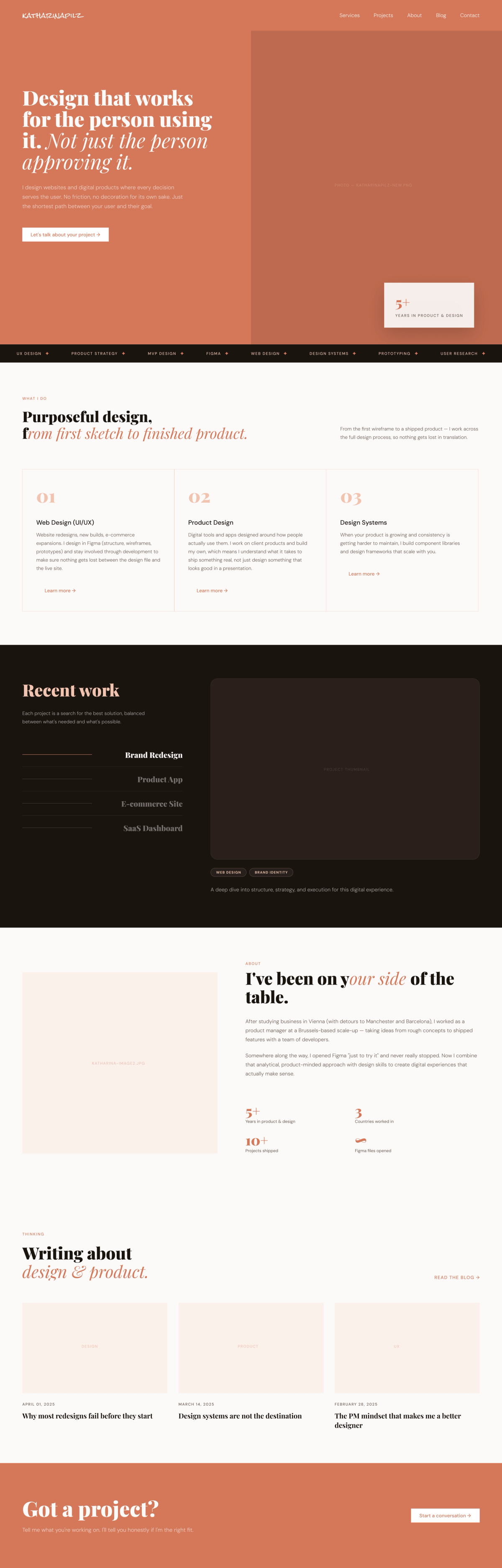
But then something interesting happened. Figma's self-healing loop kicked in. The agent took a screenshot of what it had generated, evaluated it against the codebase, spotted the problems, and started correcting. Section by section, it rebuilt and refined. By the end the result was genuinely solid: transparent nav, correct hero layout with headline and CTA, the services section with three columns, the dark recent work section, the about section, blog posts, and the footer CTA. It even picked up the mixed italic and non-italic Playfair typography within the section headings, which is a subtle detail.
The cost of that self-correction was significant though. The whole process took 10 minutes and burned through around 20k tokens.
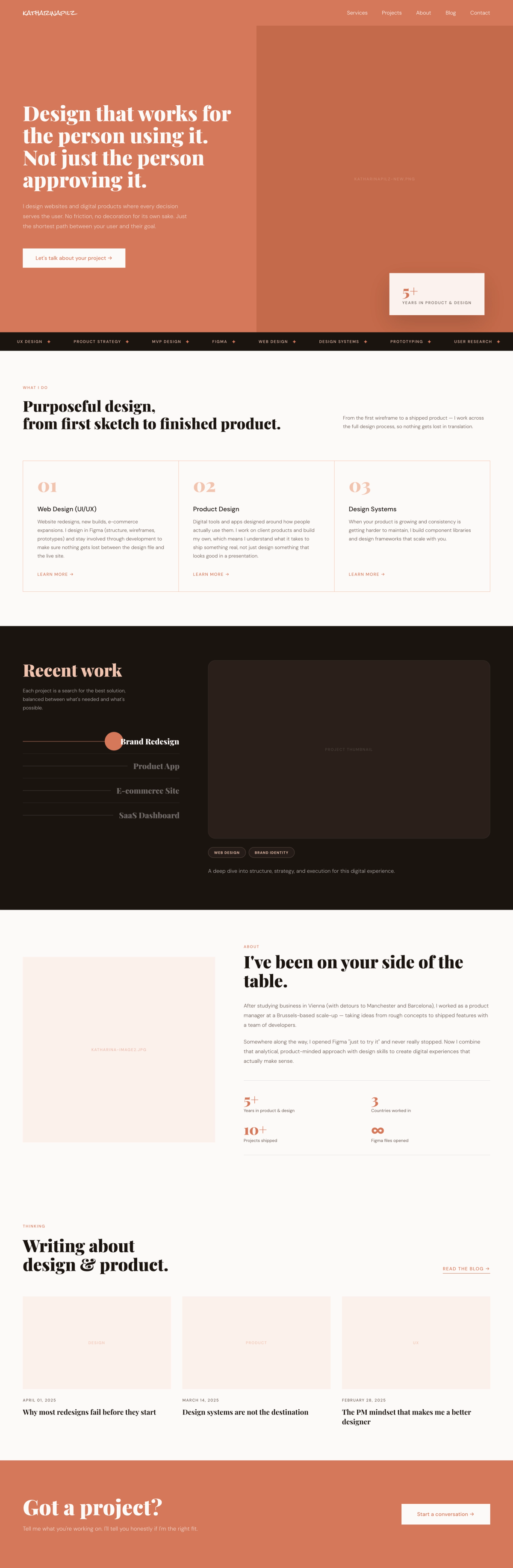
Then I ran the same prompt using the Paper Design MCP. No visible errors, no correction cycles. It produced the full homepage layout in one pass: transparent nav correct from the start, hero section with the right structure, all sections present. It also picked up subtle code-defined details that Figma missed: the decorative colored circle on selected portfolio items and the thin dividers in the about section. What it missed was the italic variation within the section headings that Figma caught through visual correction.
Time: 2 minutes 43 seconds. Tokens: 5.8k.
Worth noting that both tools got the fundamentals right. Colors were correctly applied from the design tokens in both cases, and both used auto layout throughout. The differences were in the details, not the foundation.
Also neither tool reproduced the images, which is expected since image paths in code do not carry the actual assets across.
So the comparison is not as simple as one tool winning. They got different things right. Figma's visual self-correction caught the typographic detail. Paper's code-native reading caught the subtle structural details. The quality of the end result is comparable. The efficiency is not. Paper was roughly three times faster and used roughly three times fewer tokens to get there.
In practice this means, that the details Paper missed, like the heading italic style, are the kind of thing you could fix with one targeted prompt or in one minute by hand. So essentially Paper's approach costs less and leaves you with less to fix than Figma's longer, more expensive self-correction loop.
So which tool should you use?
It depends on who you are and how you work. If you are a designer on a larger team that already lives in Figma, the agent workflow is a genuinely useful addition to what you already have. You do not need to switch anything. The self-healing loop is technically impressive and the results are solid. However, the higher token cost is worth keeping in mind if you are on a Claude (or any other AI) usage limit.
If you are a designer-developer hybrid, a solo builder, or someone working on a small team who values efficiency and staying close to the web, Paper is the more compelling tool right now. It is faster, cheaper, and its code-native approach means the output is closer to what actually ships. The gaps it leaves are small and fixable. The philosophy behind it makes more sense for the way the web works.
What strikes me most from this test is not that one tool won. It is that the philosophical difference between them showed up directly in the results. Figma reads visually and corrects. Paper reads code and translates. Each approach has strengths and blind spots that map exactly to what each tool is built on.
The broader question is where this is heading. Figma is becoming a platform: design, CMS, deployment, AI agents all in one ecosystem. That is a powerful vision for teams that want everything connected. Paper is making a narrower bet: that a code-native canvas is the right foundation for the age of AI, and that getting that foundation right matters more than building a complete platform.
Both bets are interesting and both have merit. My honest take is that Paper's foundation is the more technically coherent idea. Designing in the language of the web just makes sense. But Figma's ecosystem and maturity mean it will remain where most design work actually happens for a long time.
The tools are not really competing for the same person today. But as Paper matures and more designers become comfortable working closer to code, that might change.