Figma Finally Opens the Canvas to AI Agents: Here's what that looks like
Figma's MCP server has been around since last year. If you have been using Claude Code in your workflow, you probably already know it. Claude can read your Figma files, extract design tokens, and generate code that actually reflects your design system. Useful, but one directional.
What changed on March 24th is the other direction. Agents can now write directly to the Figma canvas. That sounds like a small update but it is not. Tools like Paper Design already let you prompt Claude to create designs in a canvas, and honestly that was something I had been waiting for Figma to catch up on. Now it has.
The new use_figma tool means Claude Code, Cursor, and other MCP clients can generate and modify design assets in Figma using your actual components and variables. Not starting from scratch. Not making things up. Working with what is already in your system.
That fits neatly into something designers and developers have been waiting for. So I tested the full workflow: bringing components from code into Figma, editing them, pushing changes back, and generating new designs from scratch using existing components.
The missing piece
Design and code have always lived in separate worlds. A designer works in Figma, a developer works in the codebase, and something always gets lost between the two. Decisions change, components drift, the Figma file stops reflecting what is actually in production. Every team knows this problem. Most have just learned to live with it.
AI tools have been chipping away at this for a while. Claude Code connected to the Figma MCP server already let agents read your design system and use that context to write better code. The information flowed from Figma into code. What you could not do was go the other way, have an agent look at your codebase and build something in Figma from it. Or ask it to create new designs using your actual components and variables rather than making things up.
That changed with Figma's latest update. And for designers who work closely with code, or alongside developers who do, it opens up a workflow that actually makes sense.
From codebase to canvas
One of the things Figma specifically highlights in their announcement is the ability to generate components from an existing codebase. And for a designer this is actually the most immediately useful starting point. If you are working on a project that already has a codebase (which most real projects do) your Figma file is either out of date, missing components that exist in code, or was never set up to reflect the actual system in the first place. You end up rebuilding things manually or just working disconnected from what is actually in production.
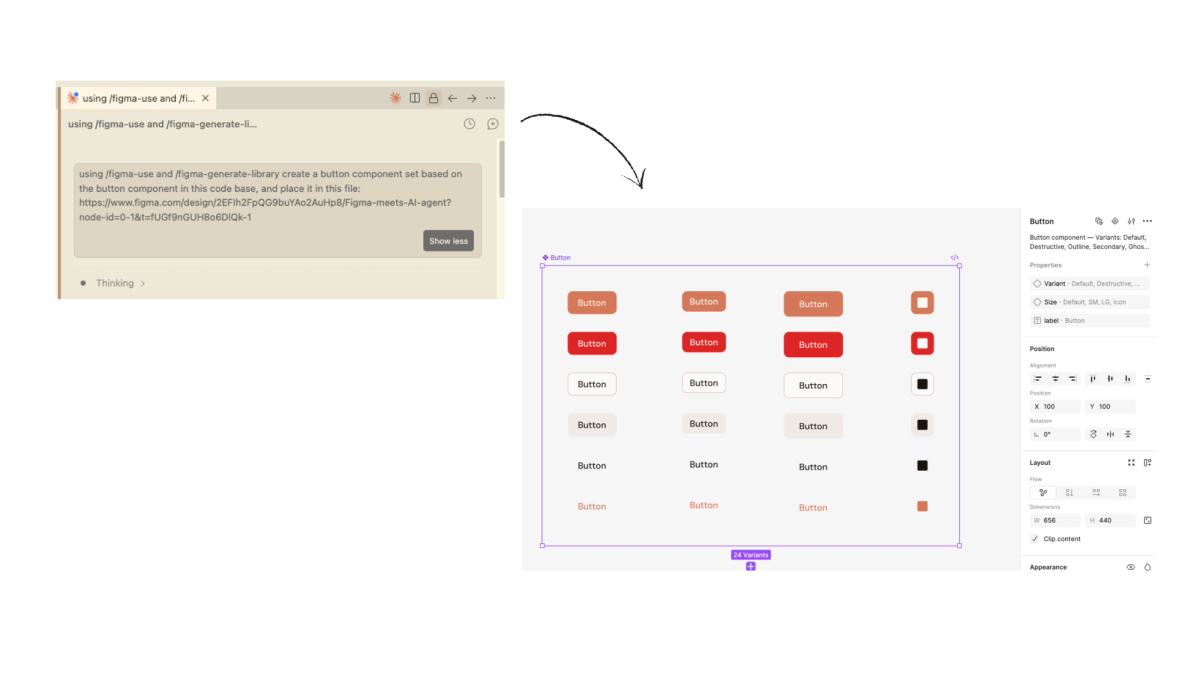
So the first thing I tested was exactly this. I have a codebase with a button component and a design token system already set up. Could Claude read that and bring it into Figma properly with the right colors, the right variants, and actual Figma variables applied?
I ran this through Antigravity, Google's agent-first IDE. But you can use any IDE that supports Claude Code, as well as Claude Code itself, or run it directly in the terminal. Install the Claude Code for VS Code extension, connect your Anthropic account, and set up the Figma MCP server. Figma has a setup guide that walks you through it.
The prompt I used was straightforward:
"Using /figma-use and /figma-generate-library create a button component set based on the button component in this code base, and place it in this file: FILE URL"
What came back was actually pretty good. Twenty four variants, proper component properties set up in the panel, variant and size toggles working correctly. It also created a Figma variable library from my color tokens with the correct hex values. That part genuinely impressed me. It did not just draw buttons in the right color, it set up the system properly.
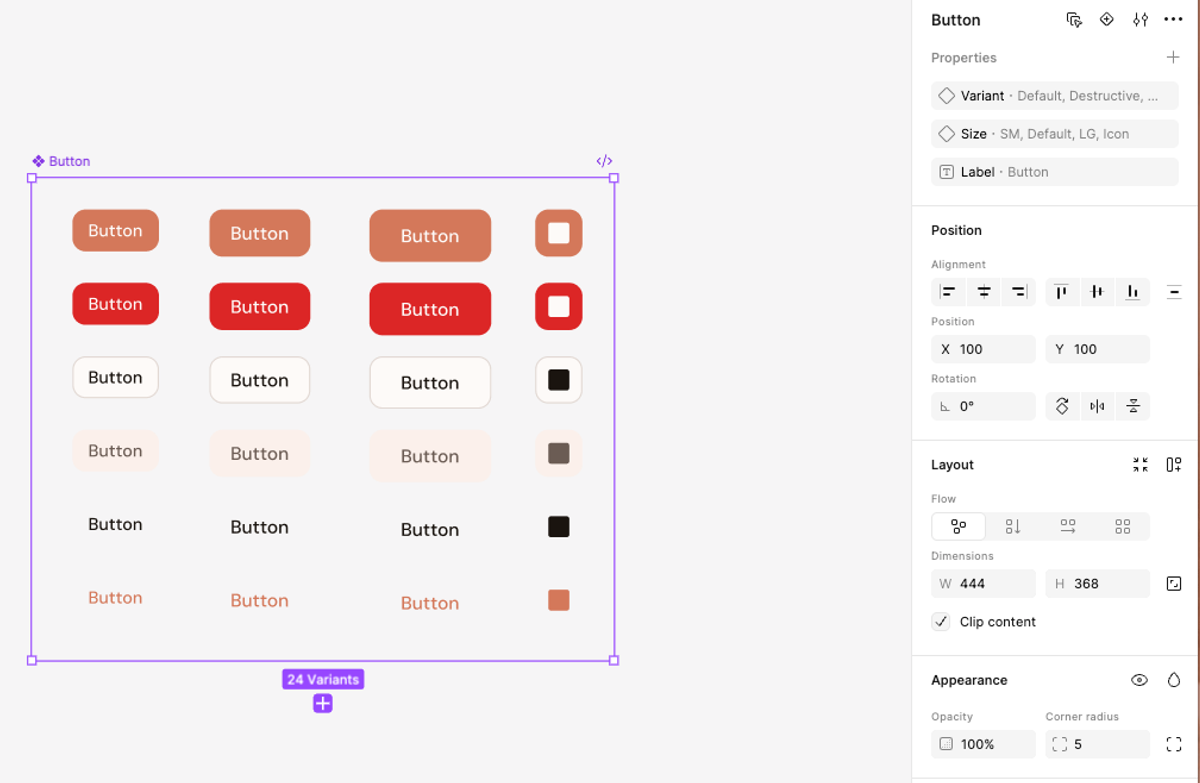
Then I noticed the rounded corners. My first instinct was that this was a mistake on the agent's part. But looking at my code, the border radius was actually defined there, I just had not intended it visually. The agent was faithfully reflecting what was in the codebase. Which turned out to be useful in an unexpected way. Pulling components from code into Figma gave me a chance to audit what is actually defined versus what I intended. The kind of mismatch a designer might not catch until it is already in production.
So I went ahead and fixed it. Removed the rounded corners, adjusted the background color of the secondary button by updating a variable directly in Figma. Then I went back to the agent and asked it to detect the changes I had made and update the codebase accordingly. It came back with a clear list of exactly what it had found and changed.
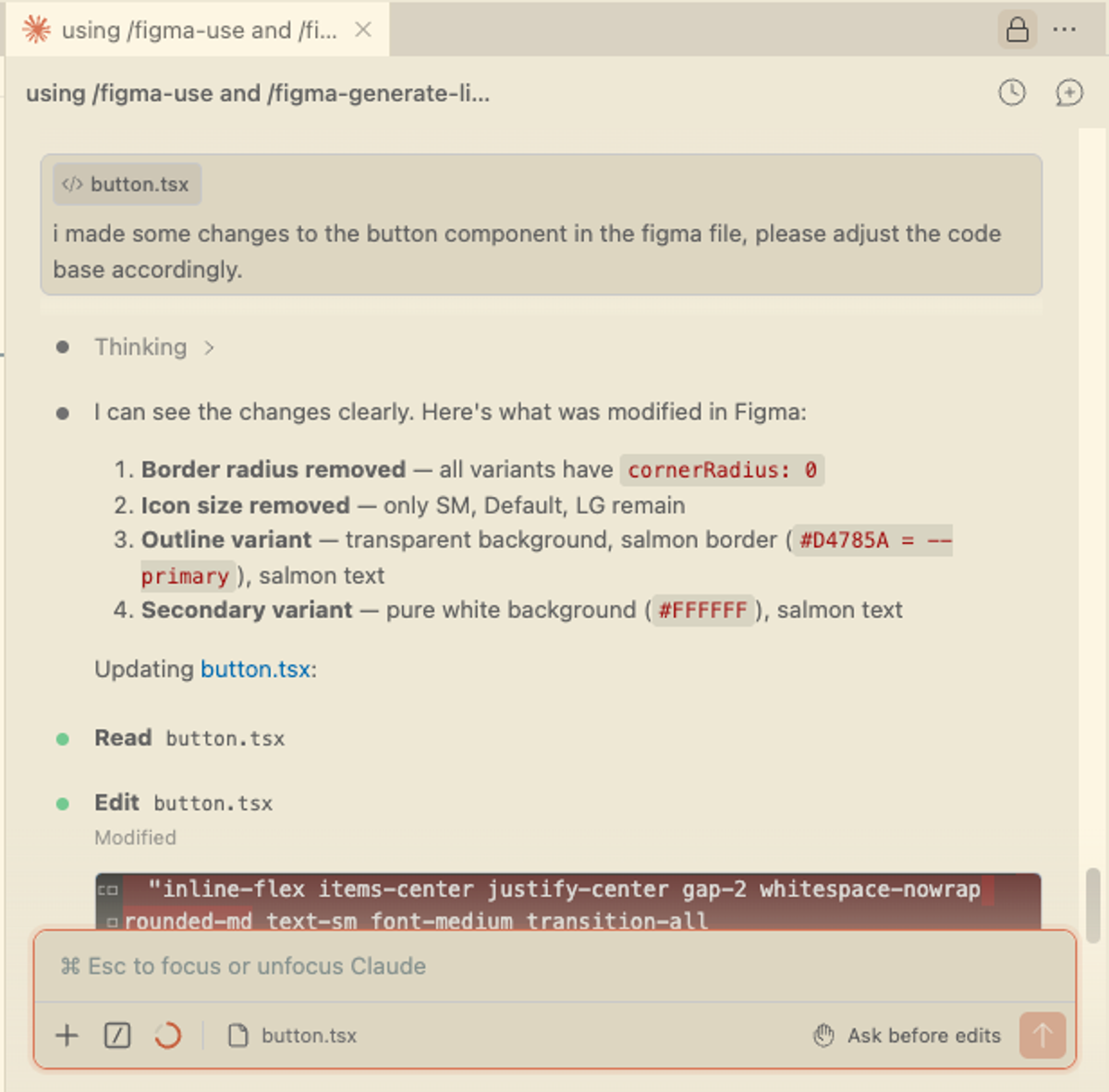
That is a workflow that would normally involve a developer conversation. Spotting a mismatch, agreeing on the fix, waiting for it to land in code. Here it happened in a few minutes, from Figma, without that back and forth.
Designing something new
Once I had the components in Figma and had tested the round trip, I wanted to push it further. Not just bringing existing things across but actually creating something new using the components and tokens already in the system to generate a section from scratch.
Figma specifically mentions this in their announcement as one of the key use cases: generating new designs in Figma using existing components and variables. For a designer this is where it gets genuinely interesting. You are not starting from a blank canvas, not rebuilding things manually, and not waiting to see what an AI invents. You have a real system and you are asking the agent to compose with it.
I asked Claude to create a pricing section in Figma. I did not give it any content direction: no copy, no pricing numbers, nothing specific. I wanted to see what it would do with just the system and a brief. The prompt I used was:
"Using my existing components and design tokens, create a pricing section in Figma. Three tiers, use the button component we just created, stay consistent with the existing design system."
The result was honestly better than I expected. The layout structure was solid, the color system applied correctly with salmon for the featured tier, dark background for the enterprise card, and also the typography mix of Playfair and DM Sans came through naturally. It i worth noting that it applied auto layout throughout, which means the output is not just visually correct but structurally usable. You can actually work with it and iterate on it without rebuilding anything.
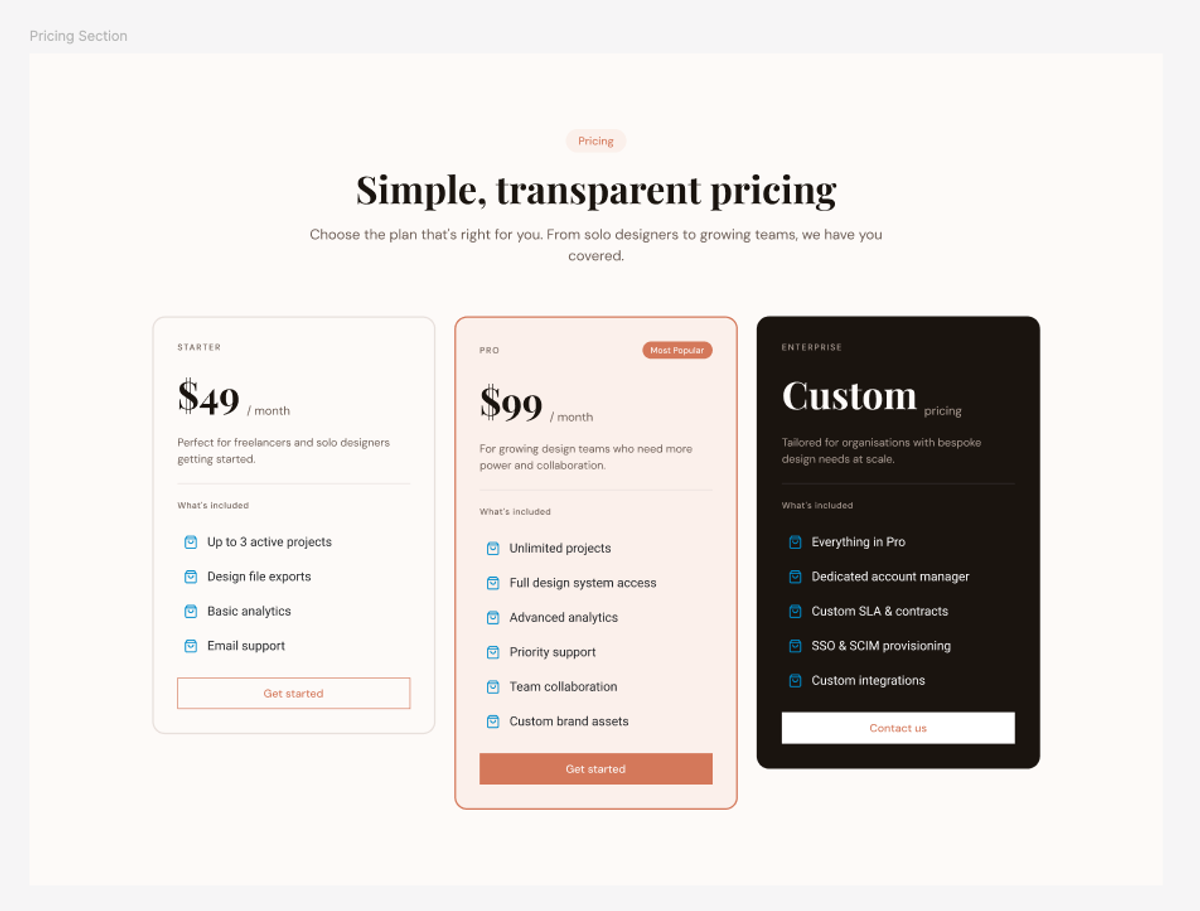
The gaps were small but telling. The icons it chose were generic blue shopping bags, clearly a placeholder since there was no icon context in the codebase. The card heights were inconsistent across the three tiers. The copy was made up, which was expected.
But that is actually the right division of labor. The agent handled the structural and systematic work, so the layout, color, typography, component usage. The things that require judgment, like icon choice, content, final polish, those are still yours. You get something eighty percent there in seconds. The remaining twenty percent is where you step in as a designer.
Using AI for design exploration within Figma
The last thing I wanted to test was pure exploration. Not syncing what exists, but using the agent to quickly explore different design directions using your own system.
This is the use case that excites me most as a designer. You have a hero section that works. But maybe you want to challenge it, see how it holds up in a different layout, explore a direction you have not tried yet. The usual workflow is heading to Dribbble, Godly, or somewhere similar, saving references that catch your eye, and then manually rebuilding directions you liked in Figma. It works, but it takes time and you are always starting from scratch rather than from your actual system.
Tools like Variant.com are interesting here too. You type a brief, get six design variations back, and can iterate on the direction you like from there. The output feels genuinely well designed rather than generic AI output. Worth knowing about if exploration is what you are after.
But what this Figma workflow offers is different. The exploration happens inside your real design system. The agent is not making things up, it is composing with what you already have.
The prompt I used was deliberately open:
"Using my existing components and design tokens, create three variations of the hero section in Figma (file: FILE URL). Each should have a different layout and hierarchy. Keep the same design system but make each direction feel distinct."
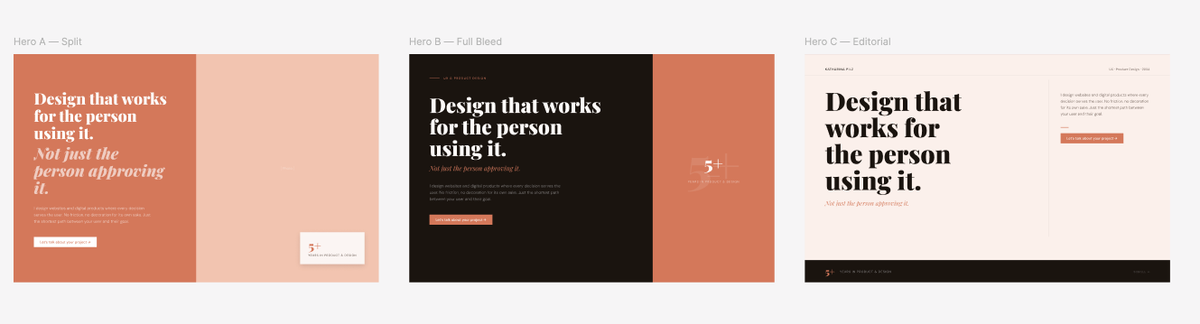
Three directions came back. A split layout (actually looked like my current one), a full bleed dark version and an editorial layout with an asymmetric grid. All three used the correct colors, the right typography mix, the actual components from the system. Not generic output, but directions that genuinely felt like they belonged to the same brand.
You can of course be more specific too. Provide a screenshot of a site you like, reference a visual direction, give it more context. The more intentional your prompt, the more directed the output. The open prompt gives you breadth, a specific prompt gives you depth.
It is worth noting that the agent did not apply auto layout here the way it did for the pricing section. For an exploration prompt that is fine, since you are after inspiration and direction, not production-ready frames. But if you want to take something further into code, specify it in your prompt. The level of detail you ask for should match what you intend to do with the output.
Another practical thing worth knowing: generating and pushing changes back and forth does burn through Claude tokens faster than a typical conversation, something to keep in mind if you are on a usage limit.
So where does this actually leave things for designers?
Well, the workflow works. And I do not mean that in a cautious, hedging way. The full loop (pulling components from code into Figma, auditing them, making changes, pushing corrections back) holds up in a real project, not just a controlled demo. The agent reads your actual design system, applies your tokens correctly, and handles the structural work that used to require a developer conversation. That is a meaningful shift.
But it is worth being clear about who this is most useful for right now. If you work closely with a codebase, either your own or alongside a developer, this fits naturally into how you already think. You understand what tokens are, you know what components exist, you can read a prompt result and know what to fix. The workflow feels like an extension of what you already do. If you are a designer who works entirely in Figma and hands off to a developer, the setup requires a bit more comfort with code tooling.
The biggest thing this changes is something more fundamental though. Designers and developers no longer have to work in isolation. Until now the canvas and the codebase have been separate worlds. Things drift, components get rebuilt from scratch in Figma that already exist in code, design decisions get lost in translation. What this makes possible is a natural back and forth that did not really exist before. You can pull what is in the codebase into Figma before changing anything in code, because sometimes you need to see something visually before you know if it is right. You can explore directions inside your real system without starting from scratch. The tools stay connected and so do the people using them.
I am genuinely glad Figma went there. It has taken a while. Paper Design has had agent-based canvas creation for some time, which I have been playing around with. But Figma is where most design teams actually live, so having this natively in that ecosystem matters.
That said, there are things Paper Design does differently that are worth looking at. A comparison of both tools will follow in the next post.