Creating SaaS Product Demo Videos with Claude and HyperFrames
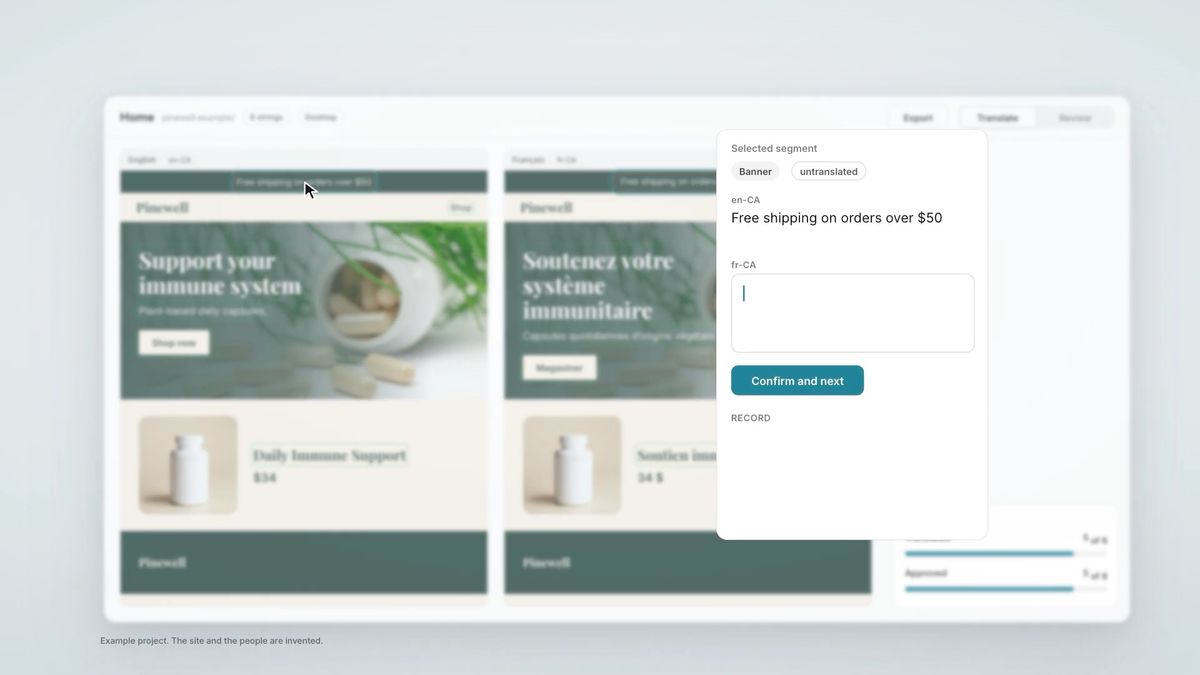
I really like those short animated product videos you see on SaaS websites. You know, the ones where the interface floats on a background, the camera zooms into different features, and everything moves so smoothly.
Every time I see one, I think I'd love to have something like that for our own products.
So I started playing around with HyperFrames, an open-source tool for creating videos with web technologies, together with Claude Code.
I ended up building a custom Claude skill for it and tested it on one of our own tools.
Here's the result.
The nice thing is that I don't have to figure out the whole process again for the next product. The skill takes care of much of the setup, helps plan the video, and works with the interface that's already there.
In this post, I'll show you how I put it together, what I changed after testing it, and how you can use the skill to create your own product demos.
From YouTube visuals to product demos
I actually came across HyperFrames while working on my YouTube videos.
I was looking for ways to make the visuals a bit more interesting, instead of just putting images on screen while talking. HyperFrames lets you create animations with HTML, CSS and JavaScript and render them as videos, so I started experimenting with it.
And since I've always liked those animated product demos you see on SaaS websites, I thought, why not try making something similar for our own tools?
Of course, there are already tools for creating motion like this. But I didn't particularly want to move into a separate animation workflow, prepare screenshots and assets, and rebuild parts of the interface somewhere else.
I was already working in Claude Code, with the actual product and its components right there. I wanted to see if I could use that as a starting point instead.
And ideally, I wanted something I could reuse across different projects rather than figuring out the entire process each time.
So I started talking to Claude about what I had in mind and asked it to turn the workflow into a skill.
Getting the result I actually wanted
The thing I struggled with most wasn't getting Claude to create a video. It was getting it to create the kind of video I had in mind.
You know when you see an animation and immediately think, that's exactly the feeling I want? But then try to explain why you like it, and suddenly it's much harder.
That was pretty much my experience.
The first version showed the interface, but it felt quite flat. The background wasn't right, and the camera wasn't really doing anything interesting.
What I liked about the SaaS videos I'd been collecting was how they guided your attention. You'd see the whole interface for a moment, then the camera would move closer to one specific element, something would happen, and you'd move on to the next part.
I could describe those movements, but the result still wasn't quite there.
What helped was giving Claude actual references. I took screenshots from a few product videos I liked, including Figma's, and shared them as inspiration.
That got me much closer. Although it introduced a different problem: Claude started borrowing the visual styling too. Not just the framing and composition, but the backgrounds and colours.
I wanted the movement from those references, not their design.
So part of refining the skill became figuring out how to separate the two. Let Claude learn from the camera movement and composition, while keeping the colours, typography and overall look specific to the product I was working on.
I also spent some time looking at the smaller details that make these animations feel smoother.
For example, when a card moves out of the interface, it should feel like the same element travelling through space, not like one screenshot disappearing and another appearing. The camera should follow the movement rather than randomly cutting between views.
The cursor should move naturally, and when it clicks something, the interface should actually respond. Even the timing of smaller elements matters. If everything appears at exactly the same moment, it can feel a bit mechanical.
I started adding these preferences to the skill too, along with guidelines for easing, camera movements and transitions.
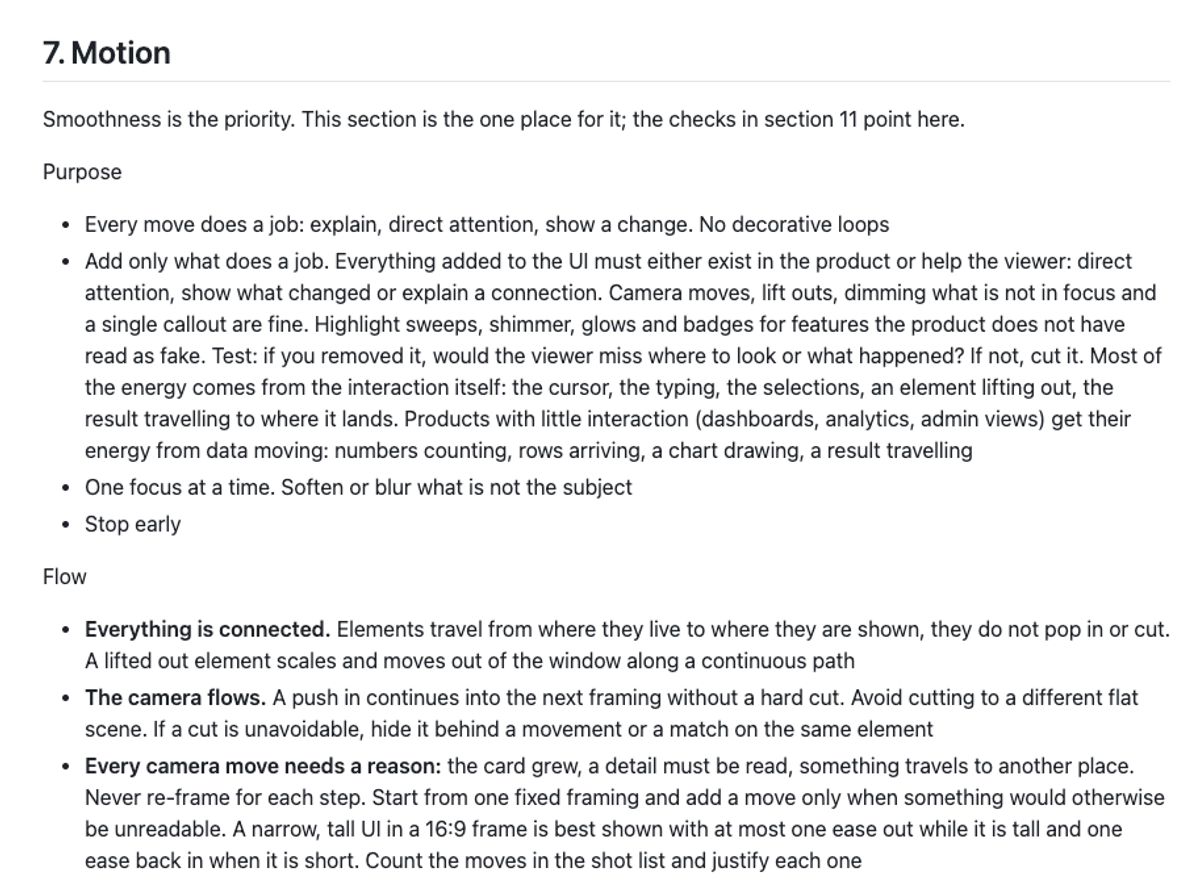
I think this is also where having a reusable skill becomes quite interesting. Every time I noticed something that wasn't working, I could adjust the instructions rather than having to explain it all again in the next project.
And I don't think I could have written all those instructions perfectly from the beginning. Some things only became obvious once I watched the video and thought, no, that's not quite what I meant.
Making the process reusable
There was another thing I noticed when I first tested the skill.
Claude went straight into creating a video brief without asking what the video was actually for.
It knew what the product looked like, but not what I wanted someone to take away from watching it.
And that makes quite a difference. A short loop for a website hero doesn't need to tell the same story as a LinkedIn video introducing a new feature.
So I added a few questions at the beginning of the workflow. Where will the video be used? What's the main message? What should someone understand after watching it?
From there, the skill creates a short brief and a shot list that I can review before it starts building anything.
It also starts by looking through the product's codebase, collecting the colours, fonts, components, logo and product copy. Where possible, Claude can capture existing rendered interface components and their states for the video, rather than recreating everything from screenshots.
That's something I particularly wanted because the videos should feel like they belong to the product, not like a separate piece of marketing material.
Before animating, the skill renders still frames of the scenes so I can check the composition. Then it creates the animation in HyperFrames and stops at a preview for another round of feedback.
Once I'm happy with it, it renders the final video.
It still needs some guidance, of course. Having a skill doesn't mean every video comes out exactly right on the first attempt.
But now the questions, planning, visual guidelines and review steps are all part of the same workflow.
And since everything happens in Claude Code, I don't have to move between different tools just to make changes.
Where I want to use these videos
The original idea was to have short product demos in the hero sections of our own tools.
We have a few products we're working on, and I'd love to show how they work without making visitors click through the entire interface.
But I can also see myself using these for feature launches, LinkedIn posts, or short explanations in client presentations.
I also like the idea of being able to create different videos from the same product. A short loop for the website, something slightly longer for social media, maybe a more detailed walkthrough for people who want to see how it works.
The skill gives me a starting point for each of those, without having to set everything up again.
Try it yourself
If you'd like to experiment with this, I've made the skill available for you to try.
You'll need Claude Code (or another compatible coding agent), HyperFrames, and ideally a product with an existing codebase.
You can find HyperFrames on GitHub. To install its skills, run:
npx skills add heygen-com/hyperframes
You can also download my custom skill here:
Product Demo Video Skill on GitHub
Add the skill folder to .claude/skills/ in your project, or ~/.claude/skills/ if you want to use it across projects.
Then open your project in Claude Code and ask it to create a product demo video using the skill.
I've tried it on a couple of our projects now, and while the results are promising, there's definitely still room for improvement. Some things need manual adjustments, and the workflow won't necessarily work equally well for every product.
But I thought I'd share it anyway, since it might be a useful starting point if you want to experiment with something similar.
And if you end up improving it or taking it in a different direction, I'd love to see what you come up with.