AI Code Assistants Are Only as Good as Your Design Thinking
I've been experimenting with AI code assistants more in my design work - tools like Antigravity, Cursor, and Claude Code. Not to replace the thinking, but to see if I can move faster from strategy to working prototype.
The results have been... mixed. Sometimes surprisingly good. Often frustratingly generic.
Here's what I've realized: the quality of what AI produces comes down entirely to the quality of your input. Not just a "better prompt" - but whether you've actually done the design work.
You can't shortcut the process. Understanding your audience, researching competitors, making strategic decisions, gathering inspiration - all of that still has to happen. AI doesn't replace design thinking. It can't.
But if you do that work and structure it in a way AI can actually use, the results are completely different.
So I decided to test it properly with a realistic project, working entirely through a code assistant from start to finish. Same design process I'd normally go through, just organized differently.
Here's what I learned.
Working in a Code Assistant
First, some context: I'm using Antigravity for this (Google's AI code assistant), but this approach works in Cursor, Claude Code, or similar tools. These aren't just chat interfaces - they can read files, reference context, and build actual working code.
The key difference from just "chatting with AI" is that you can give these tools structured context through files that live in your project. They become your source of truth that the AI references while building.
This is important because it changes how you work. Instead of trying to cram everything into one prompt, you organize your thinking into files that the AI can read and reference throughout the project.
The Project
I needed a realistic brief to test this on, so I created one: a marketing website for a construction project management software company. Target audience: construction project managers at general contractors - people managing big projects from job sites, skeptical of software that promises everything, needing tools that actually work in the field.
I started the way you always start with design work. Who is this for? Construction PMs managing million-dollar projects from trailers, coordinating subcontractors, watching budgets, dealing with delays. They're skeptical because they've been burned before by clunky software.
What would actually matter to them? Speed - not spending six months implementing new software. And genuinely mobile-first, because they're not at desks, they're on construction sites working from phones.
The positioning started emerging. This needed to feel field-first, not office-first. Confident but not corporate. Dark theme with construction orange. Sharp, industrial aesthetic. Nothing like those soft, rounded SaaS sites that all look the same.
Then I dug into competitors. Procore, Autodesk, Buildertrend, others in the construction software space. Most of them blur together: generic layouts, overwhelming navigation. That told me where the opportunity was: feel less like enterprise software, more like tools built by people who understand job sites.
I gathered visual references too. Screenshots from sites doing dark themes well - Obsidian, Linear, others with that confident modern look. Not to copy them, but to understand execution quality and aesthetic approaches that could work for this context.
This is all just normal design work. Research, strategy, understanding the space, making decisions. Nothing different yet.
I captured all of this in two places: a project-context.md file with the audience details, goals, industry insights, competitors, and positioning. And a references folder with all the visual inspiration images.
Where It Gets Different: Skills
Usually at this point, I'd open Figma and start designing. But I wanted to try something that's becoming possible with AI code assistants: using what they call "skills."
Skills are basically reusable instruction sets that teach AI how to approach specific types of work. Think of them as encoded design intelligence. Instead of explaining your design process from scratch every time, you capture it once in a skill, and AI can reference it across projects.
Where It Gets Different: Skills
Usually at this point, I'd open Figma and start designing. But I wanted to try something that's becoming possible with AI code assistants: using what they call "skills."
Skills are basically reusable instruction sets that teach AI how to approach specific types of work. Think of them as encoded design intelligence. Instead of explaining your design process from scratch every time, you capture it once in a skill, and AI can reference it across projects.
I started with Anthropic's existing frontend-design skill, which focuses on:
- Avoiding generic AI aesthetics (purple gradients, rounded defaults, predictable layouts)
- Making bold, intentional design choices
- Typography, color, and composition standards
- Matching implementation complexity to the aesthetic vision
Then I adapted it for my workflow by adding:
- Technical stack requirements (React, Next.js, Tailwind)
- Instructions to read project-context.md before starting
- Detailed guidance on analyzing visual references (extracting technical patterns, not just inspiration)
- Mobile-first approach
- Context-appropriate design considerations (industry, audience)
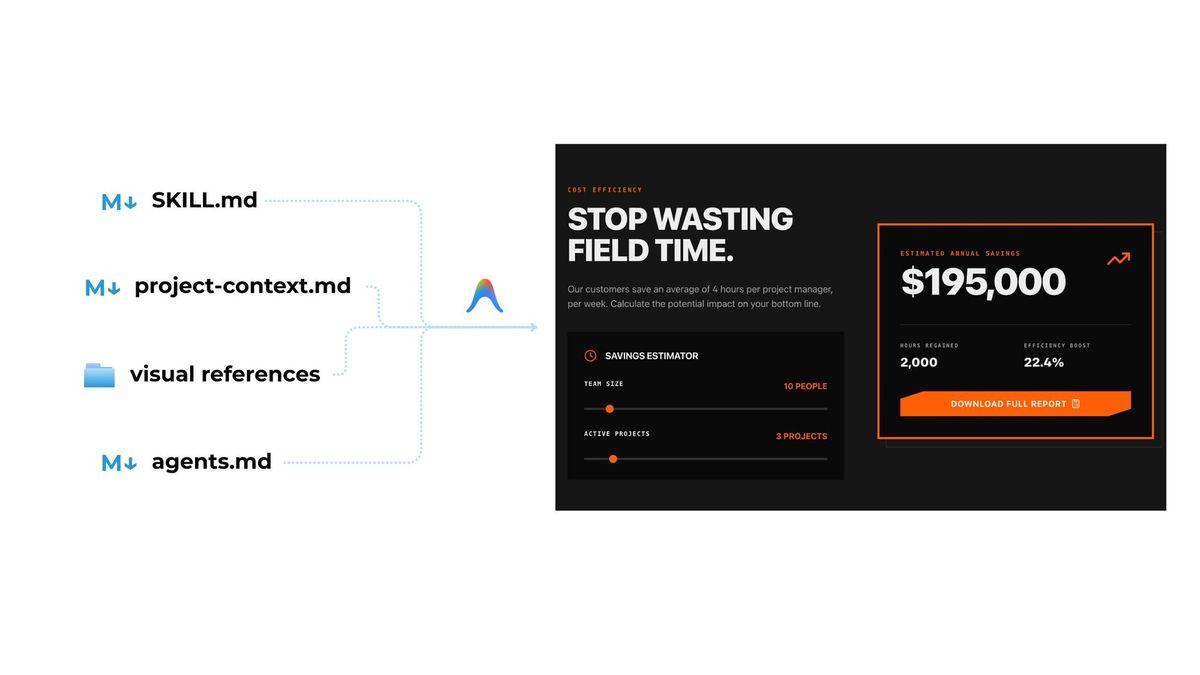
I also created a workflow file (agents.md) that gives Antigravity a step-by-step process to follow:
- Read project context
- Analyze visual references
- Define strategic aesthetic direction
- Set up technical foundation
- Create design system
- Build homepage structure
- Implement visual design
- Refine details
- Quality check
The skill teaches HOW to think about design. The workflow tells WHAT to do in what order.
So the final setup was:
- Skill = reusable design knowledge (how to think about design)
- Project context = specific input for this project (who it's for, what it needs to achieve)
- Visual references = aesthetic direction and quality standards
- Agent workflow = step-by-step process AI agent should follow
Building
With the skill and context ready, I moved to Antigravity's AI agent (though this would work in Cursor, Windsurf, or similar tools) and asked it to build the homepage.
What came back was... actually good. Sharp edges, high contrast, bold typography. Dark theme with construction orange used as an intentional accent, not splashed everywhere. It felt like software built for people who work on construction sites, not another generic platform.
The stats section hit the right tone: "2 weeks" (not 6 months), "Mobile-first" (not desktop-only), "Zero bloat" (not feature creep). The messaging matched the positioning. The visual execution matched the references without copying them literally.
Was it perfect? No. But for a first shot, it was surprisingly good. And that's the thing - you get immediate feedback on your skills and context files. If something came back generic or off-target, it usually meant my skill wasn't clear enough, or the project context was missing something important.
It becomes a feedback loop. You see what works, what doesn't. You refine your skills based on actual results. Each project makes your skills better for the next one.
I'm already thinking how to improve my frontend-design.md as well as about creating additional skills, like one specifically for design system creation. It is better to have several focused skills rather than one trying to do everything. Each skill does one thing well.
What Actually Changed
Here's the thing: I didn't do less work. I still did all the research, strategy, and decision-making. The design thinking still happened.
What changed was how I captured that work. Instead of creating mockups in Figma, I encoded my design process in a skill that can be reused. Instead of scattered notes and conversations, I wrote clear project context.
The skill teaches AI how to think about design problems. The project context gives it the specific problem to solve. Together, they produce output that's contextually appropriate, not generic.
And here's the win: that skill is now reusable. Next project, I don't start from scratch. I just provide new project context and references, and the skill guides the execution.
Why This Matters for Designers
I've seen a lot of designers worried that AI will replace them. But working this way, I don't think that's what's happening.
What's changing is where we spend our time. Less time pushing pixels in Figma, more time on the strategic thinking that actually matters. Understanding audiences, identifying opportunities, making intentional choices about positioning and direction.
Skills let you encode your expertise. Not replace it - encode it. The design thinking that makes you good at what you do can be captured in a way that makes execution faster without losing quality.
You're not being replaced. You're encoding what you know so AI can handle the repetitive parts while you focus on the decisions that require judgment and context.
The designers who figure out how to work this way will be faster and more effective. The ones who try to compete with AI on execution will struggle.
Where Figma Fits In
You might be wondering: does this mean Figma is dead? Not at all.
In fact, Figma just announced Claude integration that lets you move fluidly between code and design tools. You can prototype quickly in code, bring it into Figma for visual refinement or client feedback, then push changes back to code.
The workflow is becoming more flexible. Sometimes you start in Figma. Sometimes you start in code. Sometimes you go back and forth. The tool matters less than the thinking behind it.
What I've realized is that starting in code can be really powerful for certain projects - especially when you have clear direction and want to see something working quickly. But I'm not abandoning Figma. I'm just adding another way to work.
The lines between design tools and code are blurring. And that's actually exciting. It means we can choose the right tool for each phase of work, rather than being locked into one workflow.
What I'm Taking Forward
This workflow won't replace Figma for everything. Visual exploration, complex interactions, that tactile experience of designing - those still have value. And sometimes you just want to sketch and see where it goes.
But for projects where you can clearly define the system and need to move from strategy to working prototype quickly, this approach works really well.
The quality of your output comes down to the quality of your process. And the quality of your process comes down to how clearly you understand what you're trying to achieve.
Skills force that clarity. You can't be vague when you're writing instructions. You have to make actual decisions about what matters and why.
And honestly? Going through the process of creating skills makes you a better designer anyway. It forces you to articulate your thinking, codify your process, and be intentional about your choices.
AI doesn't make design easier in the sense of less work. The research still happens. The strategic thinking still happens. Understanding your audience still happens. Making design decisions still happens.
What AI changes is the execution layer. Once you know what you want and can articulate it through skills and context, building happens fast. Really fast.
But it starts with doing the work. The process still matters. You just capture it differently.